
You pay to bring someone to your website or Instagram profile. They browse, show interest, then leave — without enquiring or buying. This is the normal behaviour of most visitors, across most businesses and industries. The question is what happens next.
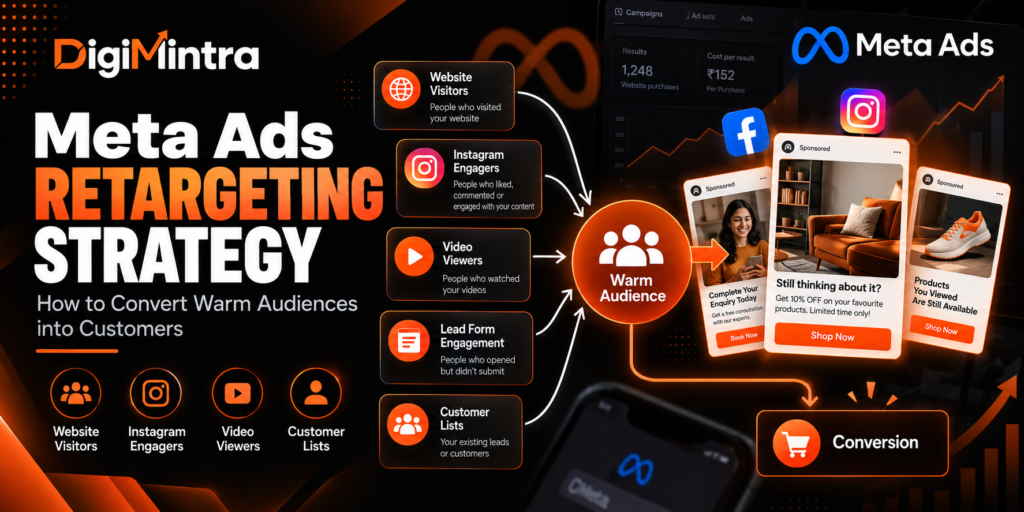
A Meta Ads retargeting strategy gives you a structured way to reconnect with people who have already demonstrated some level of interest — website visitors, video viewers, Instagram engagers, lead form openers, and existing customers. Because these audiences already know your business exists, the conversation is different from introducing yourself to a cold stranger.
Retargeting does not automatically convert browsers into buyers. The quality of the audience signal, the relevance of the message, the accuracy of tracking, and the strength of the offer all determine whether retargeting contributes to business results. This guide explains how to build retargeting campaigns that work — and how to diagnose them when they do not.
What Is Meta Ads Retargeting?
Meta Ads retargeting (also called remarketing) is the practice of showing ads specifically to people who have previously interacted with your business — through your website, your Facebook Page, your Instagram account, your videos, your lead forms, or your customer list.
These people are described as warm audiences because they are no longer completely unfamiliar with your brand. They have encountered it in some form. This is meaningfully different from a cold prospecting campaign targeting people with no prior exposure.
How it works technically: When someone visits your website, the Meta Pixel (a piece of code on your site) or the Conversions API (a server-side integration) records that visit and passes the signal to Meta. Meta uses this signal to build a Custom Audience — a defined group of people you can serve ads to. Similarly, when someone engages with your Instagram content, watches your video, or opens your lead form, Meta records that interaction as an on-platform signal, which can also be used to build Custom Audiences without any website tracking required.
The difference from prospecting: Prospecting campaigns target people with no prior brand exposure — typically using broad targeting, interest signals, or lookalike audiences. Retargeting targets people who have already interacted. The messages, offers, creative approach, and success metrics are different for each.
An important 2026 context note: With Advantage+ Audience now the default in many campaign types, Meta’s AI delivery system will sometimes include warm audiences within prospecting campaigns automatically — because it recognises that warm audiences often convert more efficiently. This does not make explicit retargeting campaigns unnecessary, but it does mean that some budget consolidation (running warm and cold audiences in the same campaign) has become a legitimate approach for accounts where the separate retargeting audience is too small to support a standalone campaign.
Warm Audience Types: What You Can Retarget in 2026
Meta currently supports several distinct Custom Audience sources. Each has different intent characteristics, tracking requirements, audience size implications, and retention windows. Understanding these differences determines which audiences are worth prioritising for your business.
| Audience Source | Typical Intent Signal | Tracking Required | Max Retention | Key Limitation |
|---|---|---|---|---|
| Website visitors | Medium to high (varies by page) | Meta Pixel + CAPI recommended | 180 days (purchase events: longer) | Reduced for iOS opted-out users; requires adequate traffic volume |
| Instagram account engagers | Low to medium | None — on-platform | 365 days | Social engagement ≠ purchase intent |
| Facebook Page engagers | Low to medium | None — on-platform | 365 days | Varies by interaction type |
| Video viewers | Low to medium (higher % watched = stronger) | None — on-platform | 365 days | Viewership does not confirm buying intent |
| Lead form openers/submitters | Medium to high | None — on-platform | 90 days | Submitters vs openers are very different intent levels |
| Customer lists | Highest (known customers or leads) | CRM/CSV upload | Indefinite (manual refresh needed) | Match rates vary; requires consent and lawful basis |
| App activity | High (app users) | Meta SDK or server-side | 180 days | Requires app integration |
Website Visitors
Website Custom Audiences are built from visitor behaviour tracked by the Meta Pixel and, ideally, the Conversions API (CAPI). They remain the foundation of most retargeting strategies for businesses with meaningful website traffic.
The most common mistake is creating one broad “all website visitors — last 180 days” audience and treating everyone in it identically. A person who visited your pricing page three days ago is a very different prospect from someone who landed on your homepage six months ago. Segmenting by page type and recency produces more relevant messaging.
Useful website audience segments to consider:
- All website visitors (30 days): General warm audience — reinforce your value proposition
- Specific product or service page visitors (14–30 days): Show them product-specific information or address common questions
- Pricing or “How it Works” page visitors (7–14 days): Higher intent — address purchase concerns and friction
- Lead form or contact page visitors who did not submit (7–14 days): Very high intent — may need an alternative offer or simpler next step
- Past purchasers or converters (180 days): Use for exclusion from acquisition campaigns, or for cross-sell and loyalty messaging
Tracking accuracy matters: Pixel-only tracking can undercount iOS users who have opted out of cross-app tracking (following Apple’s ATT framework). The Conversions API sends event data directly from your server to Meta, recovering a meaningful proportion of these missed signals. For retargeting purposes, this means your website audiences will be more complete and accurate with CAPI correctly configured alongside the Pixel.
Minimum audience size: Meta requires a minimum audience size for ad delivery. If your website audience falls below the threshold — typically around 100 users, though exact delivery begins to become unstable well below 1,000 — ads may not deliver effectively or at all. Low-traffic businesses may need to rely on engagement audiences instead.
Instagram and Facebook Engagers
Engagement Custom Audiences are built entirely from on-platform interactions — no website tracking required. This makes them accessible even to businesses with limited website traffic, and they are unaffected by iOS privacy restrictions.
Available engagement sources include: Instagram account engagers (people who visited your profile, liked, commented, saved, or messaged), Facebook Page engagers (people who visited, interacted with a post, or sent a message), and people who interacted with your ads.
Important context: Social engagement does not equal purchase intent. Someone who liked a post or watched a Reel may be interested in the content without any intention to buy. Engagement audiences are genuinely warm — they know the brand — but they require messaging that bridges social familiarity to commercial action. A strong next step is to offer something of genuine value: a free resource, a clear benefit statement, or an easy initial commitment.
Video Viewers
Video view audiences allow you to segment people based on how much of a video they watched — typically at thresholds of 25%, 50%, 75%, and 95% (ThruPlay). Someone who watched 75% or more of a relevant educational or product video has demonstrated significantly more interest than someone who saw three seconds before scrolling.
Video view audiences can be useful for a tiered retargeting approach: people who watched briefly receive brand reinforcement; people who watched a significant portion receive a more direct conversion offer. This is a strategic hypothesis worth testing — video viewership does not guarantee purchase intent.
Lead Form Engagement
Meta Instant Form audiences allow you to build audiences from people who opened a lead form without submitting, and separately from people who submitted the form. These are very different intent signals. People who opened but did not submit may have encountered friction (too many fields, unexpected questions) or were interrupted. A follow-up ad addressing common objections or simplifying the offer can recover a proportion of these prospects.
Customer Lists and Existing Leads
Customer list Custom Audiences allow you to upload your own data — email addresses, phone numbers, or names — which Meta hashes and matches against its user base. Match rates vary; a well-maintained, recent list of email addresses may achieve match rates in the 50–80% range, but this varies significantly based on data quality and format.
Use cases:
- Excluding existing customers from new-customer acquisition campaigns
- Cross-selling or upselling to existing customers
- Re-engaging inactive customers
- Retargeting qualified leads who have not yet converted
- Reaching known leads through a different channel to support sales follow-up
Privacy and compliance: Customer list uploads must comply with Meta’s Custom Audience Terms and applicable data protection requirements. You must have an appropriate legal basis for using the data and, where required, relevant consent. Do not upload data without verifying your compliance obligations for your jurisdiction.
Setting Up Custom Audiences: A Step-by-Step Guide
The following reflects the current Meta Ads Manager workflow as of 2026. Interface labels and menu paths can vary by account, region, and rollout. If you see different options, verify the current layout in your own account before proceeding.
- Verify your tracking first. Before creating audiences, confirm that the Meta Pixel is installed and firing correctly on your website, and that the Conversions API is configured if possible. Check your Events Manager to see which events are registering and whether there are any data quality issues. Audiences built on broken or incomplete tracking will be less accurate.
- Navigate to Audiences. In Meta Ads Manager, open the main menu and select “Audiences.” This takes you to the Audience Manager where you can create, view, and manage all Custom Audiences.
- Create a Custom Audience. Click “Create Audience” and then “Custom Audience.” You will be shown the available audience sources.
- Select your source. Choose “Website” for pixel-based audiences, or the relevant engagement source (Video, Instagram Account, Facebook Page, Lead Form, etc.) for on-platform audiences. For customer list uploads, choose “Customer List.”
- Configure the audience rules. For website audiences, select your Pixel, choose the relevant event or URL rule (all visitors, specific page URLs, or standard events like ViewContent or AddToCart), and set the retention window. For engagement audiences, choose the interaction type and the time window.
- Add exclusions where appropriate. If you are building a mid-funnel retargeting audience, consider excluding people who have already completed the conversion goal (for example, exclude purchasers from a cart-abandonment audience).
- Name the audience clearly. Use a consistent naming convention — for example: WCA | Pricing Page | 14 Days or ECA | IG Engagers | 30 Days. Clear naming makes campaign management significantly easier at scale.
- Save and wait for population. Website audiences need your site to have received traffic with the relevant Pixel events firing. Audiences below Meta’s minimum size threshold will show as “Too small” and will not be usable until they grow.
Pre-launch tracking checklist:
- ☐ Meta Pixel installed and verified in Events Manager
- ☐ Key events firing correctly (PageView, ViewContent, Lead, Purchase as relevant)
- ☐ Conversions API configured (recommended) or verified as unnecessary for your setup
- ☐ Event deduplication checked (Pixel and CAPI should not double-count the same event)
- ☐ Privacy policy in place if collecting user data through tracking
Audience Exclusions: Why They Matter More Than Most Advertisers Realise
Exclusions prevent your ads from reaching people for whom the message is no longer appropriate. Without them, you risk showing acquisition ads to people who already purchased, re-engagement ads to people who are already active customers, and discount offers to people who would have converted at full price.
Note on changes: Meta removed detailed targeting exclusions (interest-based) in March 2025. However, Custom Audience exclusions — excluding a defined group of people from an ad set — remain fully available and are the primary exclusion tool for retargeting strategy.
| Business Goal | Audience to Include | Recommended Exclusion | Reason |
|---|---|---|---|
| Acquire new customers | Website visitors / engagers | Existing purchasers (customer list) | Budget should not be spent re-acquiring customers |
| Convert leads | Lead form submitters / website visitors | People who already booked / purchased | Message is no longer relevant to them |
| Recover form abandoners | Lead form openers (did not submit) | Lead form submitters | Submitters need a different follow-up, not the same form ad |
| Cross-sell to customers | Existing purchasers | People who already bought the cross-sell product | Avoids irrelevant offers |
| Re-engage cold leads | CRM leads — 90+ days, no purchase | Active recent leads | Active leads need sales follow-up, not more ads |
Audience overlap between retargeting and prospecting audiences is common and does not automatically harm performance. Meta’s system manages delivery across multiple campaigns targeting overlapping audiences, and the same person seeing both a prospecting ad and a retargeting ad is often appropriate. The concern is when your retargeting budget is being spent on people who have no reason to receive that message.
Campaign Structure: How to Organise Retargeting Without Unnecessary Complexity
There is no universally correct retargeting campaign structure. The right structure depends on your audience sizes, available budget, business model, and the diversity of messages you need to send to different groups.
Approach A: Consolidated Retargeting (Recommended for Most Small Accounts)
If your warm audiences are small — fewer than a few thousand people — running one retargeting campaign with a consolidated audience and controlled budget is often more practical than splitting into multiple ad sets. Fragmented small audiences result in slow learning, inconsistent delivery, and harder-to-read data.
Retargeting Campaign (one objective, ABO)
└── Ad Set: All warm audiences combined
    ├── Ad 1 — Social proof / testimonial
    ├── Ad 2 — Objection handling
    └── Ad 3 — Clear offer or next step
Approach B: Segmented Retargeting (For Accounts with Sufficient Audience Volume)
When audiences are large enough and the messages need to meaningfully differ based on intent level, segmented ad sets make sense. This requires enough budget to produce useful data in each segment.
Retargeting Campaign (ABO)
├── Ad Set 1: High-intent website visitors (pricing/checkout pages, 7–14 days)
│   ├── Ad — Address purchase friction
│   └── Ad — Clear offer
│
├── Ad Set 2: General website visitors + engagers (30 days)
│   ├── Ad — Value proposition reinforcement
│   └── Ad — Social proof
│
└── Ad Set 3: Lead form openers (did not submit, 14 days)
    ├── Ad — Simpler offer / alternative CTA
    └── Ad — FAQ / objection handling
Approach C: Customer Lifecycle Retargeting
For businesses with meaningful CRM data and customer history, a more sophisticated lifecycle structure can work well — separating new leads, unconverted leads, recent customers, and lapsed customers into distinct messaging tracks. This is most appropriate for businesses with a longer sales cycle or repeat-purchase model.
Important: Keep structure proportionate to audience size and budget. A campaign with four ad sets, each reaching 200 people, is unlikely to produce useful data and may not deliver at all. More structure is not the same as better strategy.
Retargeting Ad Creative: Match the Message to What They Already Know
The most common retargeting creative mistake is showing the same ad a cold audience would see. Someone who visited your pricing page three days ago does not need to be told what you do. They need to know why they should act now, what their concern might be, and what the next step looks like.
Effective retargeting creative acknowledges where the person is in their decision process without explicitly saying “we know you visited our website” — which would feel intrusive and is not how the ad system works in any case.
| Audience | Likely Barrier | Message Angle | Example Headline | CTA |
|---|---|---|---|---|
| General website visitor | “I’m not sure this is for me” | Reinforce the core value proposition | “Here’s what [Business] actually does for [result]” | Learn More / Book a Call |
| Product/service page visitor | “I have questions I didn’t get answered” | FAQ, product detail, proof | “The most common questions about [Product] — answered” | See Details / Get Started |
| Pricing page visitor | “Is it worth it?” / “I can’t decide” | ROI, comparison, testimonial | “What [Customers] say after 3 months with [Brand]” | Book Free Consultation |
| Lead form opener (no submit) | Friction / not the right moment | Simpler next step or alternative offer | “Takes 2 minutes. No obligation.” | Get Started / Apply Now |
| Instagram engager | “I enjoyed the content but haven’t thought about buying” | Bridge from content to offer | “You’ve seen what we do. Here’s how to get started.” | Find Out More / Book Now |
| Video viewer (75%+) | “I’m interested but haven’t taken action” | Continue the conversation | “Ready to take the next step? Here’s what happens when you do.” | Book / Register / Apply |
| Existing customer | “I didn’t know about [other product]” | Cross-sell / upsell / loyalty | “You already use [X]. This is what most people try next.” | Explore / Shop Now |
Five hypothetical retargeting ad examples (illustrative — not real campaigns):
Example 1 — Local Plumbing Business, Pricing Page Visitor
Primary text: “Not sure if we’re right for you? Here’s what 200+ Delhi homeowners have said about our emergency plumbing service — including what they wish they’d known before calling someone else.”
Headline: “Honest Reviews from Real Customers.”
CTA: Book a Call
Example 2 — Online Coaching Programme, Video Viewer (75%+)
Primary text: “You watched most of our video on [topic]. If that resonated, the next step is a quick call to find out whether our programme is actually the right fit — no pressure, no pitch.”
Headline: “Curious if this could work for you?”
CTA: Book a Free Clarity Call
Example 3 — E-commerce Skincare Brand, Checkout Visitor
Primary text: “Something stop you? Here’s the thing — we offer free returns on all orders, and our team answers questions within a few hours. Still not sure? [Review quote with permission and verification]”
Headline: “Risk-free. Easy returns. Fast answers.”
CTA: Complete Your Order
Example 4 — B2B SaaS, Lead Form Opener
Primary text: “Didn’t finish signing up? We made the process shorter. You can now request a demo with just your name and email — we’ll take it from there.”
Headline: “Two fields. That’s it.”
CTA: Request Demo
Example 5 — Education Platform, Instagram Engager
Primary text: “You’ve seen our [topic] content. Our structured 8-week course goes much deeper — with live sessions, real feedback, and a clear outcome. The next intake is in [timeframe].”
Headline: “Ready to go from content to results?”
CTA: See the Course
Budget Allocation for Retargeting
There is no universal rule about how much of your ad budget to allocate to retargeting. The right allocation depends on the size of your warm audience, your business economics, and the conversion objective.
The fundamental principle: budget allocation should be proportionate to audience size. Spending ₹50,000 per month retargeting an audience of 500 people will likely result in extreme frequency, creative fatigue, and a poor audience experience. Spending too little on a sizeable warm audience leaves conversions on the table.
Three hypothetical budget scenarios (illustrative assumptions — actual results will vary):
Scenario 1 — Local Service Business (Modest Monthly Enquiries)
A local home renovation business generating 300–500 website visits per month from organic and paid sources. Website-based retargeting audience: approximately 200–400 people. Practical approach: A small dedicated retargeting budget (illustrative: ₹3,000–8,000/month) targeting all website visitors excluding enquiry submitters. If the audience is too small to deliver reliably, consider combining website visitors with Instagram engagers. Focus on 2–3 ads maximum to avoid fragmenting delivery.
Scenario 2 — E-commerce Store (Meaningful Product-Page Traffic)
An e-commerce brand generating 3,000–5,000 monthly website visitors with tracked add-to-cart and checkout events. Retargeting audiences: product viewers, cart abandoners, checkout visitors. Practical approach: Segmented retargeting by intent level becomes viable. Higher-intent segments (checkout visitors) may justify more spend per person given higher conversion probability. Exclude past purchasers from the main retargeting flow; run a separate cross-sell or loyalty campaign for them.
Scenario 3 — B2B Professional Service (Long Consideration Cycle)
A B2B consulting firm where prospects research for weeks or months before enquiring. Website audiences: service page and case study visitors. Practical approach: Longer retention windows (60–90 days) make sense given the extended buying cycle. Creative should focus on authority, case studies (where verifiable), and low-friction next steps. Frequency should be modest — this audience is researching, not ready to be pushed. Budget decisions should reflect that a single qualified lead may be worth a significant amount, justifying a relatively higher per-lead cost.
Measuring Retargeting Performance
Retargeting metrics should be evaluated differently from prospecting. Because you are reaching smaller, warmer audiences, you should typically see higher conversion rates, lower CPMs, and higher CTR — but the absolute volume of conversions will also be lower.
| Symptom in Ads Manager | Possible Explanation | What to Investigate | Possible Action |
|---|---|---|---|
| Frequency rising, CTR falling | Creative fatigue; audience overexposed | Audience size; number of active ads; campaign duration | Refresh creative; expand audience; reduce budget temporarily |
| Low delivery / underspending | Audience too small; restrictive exclusions | Audience size in Audience Manager; exclusion rules | Broaden retention window; combine audiences; review exclusions |
| High CTR, low conversions | Landing page issues; offer mismatch; tracking problem | Landing page load speed and relevance; conversion event firing; offer clarity | Fix landing page; review offer; verify pixel/CAPI events |
| Conversions showing but no sales | Lead quality problem; sales follow-up issue; form submissions not qualified | Lead quality with sales team; form questions; audience segment | Add qualifying question; review audience segment; improve sales follow-up |
| Rising CPL / CPA over time | Audience saturation; creative fatigue; external factors | Frequency; audience size trends; competitor activity | New creative; audience refresh; consider expanding warm audience |
| Meta reports conversions; GA4 shows fewer | Attribution model differences; cross-device tracking; view-through attribution | Attribution window settings in Meta; GA4 session sources | Compare last-click data; use Meta’s own comparison tools |
Attribution warning: Meta Ads Manager reports conversions using a click-through and view-through attribution window (default: 7-day click, 1-day view). This means some conversions reported in Meta may have occurred through organic search, direct traffic, or other channels — but Meta’s system credits the ad because the person saw it within the attribution window. Retargeting in particular can appear to over-perform on platform attribution because warm audiences were likely to convert through multiple touchpoints. This does not mean retargeting is not contributing — but it does mean you should evaluate retargeting performance alongside other data sources and, where possible, compare incremental results rather than relying solely on platform-reported ROAS.
Troubleshooting: Why Retargeting Campaigns Sometimes Fail
1. Audience Is Too Small
Symptom: Audience shows “Too Small” in Audience Manager; ads not delivering. Cause: Insufficient website traffic, very short retention window, or overly specific page rules. Fix: Extend the retention window; broaden the URL rules; combine website visitors with engagement audiences; increase prospecting spend to grow the warm audience over time.
2. Campaign Not Spending Budget
Symptom: Daily budget is not being used. Cause: Small audience; heavy exclusions; low bid competitiveness; account delivery issues. Fix: Check audience size first. If the audience is small but valid, the budget is likely just larger than the available reach can absorb — which is not a problem, just a sign to reduce the daily budget.
3. Ads Spending but Not Converting
Symptom: Spend is happening; impressions and clicks are recording; but conversions are minimal or absent. Causes: Poor message-audience fit; landing page issues; conversion tracking not working; offer mismatch. Fix: Diagnose each component separately — check the landing page, verify conversion events are firing, review the ad creative for relevance, and confirm whether the issue is pre-click (creative) or post-click (landing page/tracking).
4. Existing Customers Keep Seeing Acquisition Ads
Symptom: Customers complain about seeing ads for a product they already bought. Cause: Missing exclusion for purchasers or customer list on the acquisition campaign. Fix: Create a Custom Audience of purchasers and add it as an exclusion to acquisition campaigns.
5. CTR Is High but Lead Quality Is Poor
Symptom: Ads are getting clicks and conversions but the leads are not qualifying through to sales. Causes: Misleading or overpromising creative; form has no qualifying question; wrong audience segment selected. Fix: Add one qualifying question to the form; review the creative for accuracy and alignment with the actual service; evaluate whether the audience segment is genuinely relevant.
6. Pixel Events Missing or Duplicated
Symptom: Events Manager shows no events, inconsistent counts, or duplicated event records. Cause: Pixel not installed on all pages; CAPI and Pixel both firing without deduplication; tag manager configuration issues. Fix: Use Events Manager’s test tool to verify events on specific pages; check deduplication is in place if both Pixel and CAPI are active; verify the Pixel is installed on all relevant pages including thank-you pages.
Business-Specific Examples
All scenarios below are hypothetical and illustrative. They do not represent real client results or DigiMintra campaigns.
E-commerce (Fashion Brand)
Business goal: Recover revenue from non-converting product page visitors. Audience: Product page visitors (14 days), excluding purchasers. Message: Product-specific creative — address common concerns (sizing, returns policy, delivery time). Exclusion: Past purchasers. Conversion event: Purchase. Key metric: ROAS, cost per purchase. Limitation: iOS tracking limitations mean not all product page visitors will be captured by the Pixel alone.
Local Service Business (Dental Clinic)
Business goal: Convert website visitors into appointment bookings. Audience: All website visitors (30 days) + Instagram engagers (30 days), excluding existing patients via customer list. Message: Reassurance, team introduction, easy booking process. Conversion event: Lead (form submission or phone call). Key metric: Cost per booking enquiry, qualified appointment rate. Limitation: Local audience may be small; careful frequency management needed.
B2B Lead Generation (HR Software)
Business goal: Generate qualified demo requests from people who researched the solution. Audience: Pricing page visitors (14 days) + lead form openers who did not submit (7 days). Message: Case study-based ad (verified, with permission) addressing the most common objection. Conversion event: Lead. Key metric: Cost per qualified demo, sales conversion rate from demo. Limitation: B2B audiences on Meta may be smaller than on LinkedIn; evaluate whether conversion volume is sufficient for reliable learning.
Education Business (Online Course)
Business goal: Convert people who engaged with free content into paid enrolments. Audience: Video viewers (75%+ of relevant free content) + webinar registrants who did not purchase. Message: Curriculum detail, student outcomes (verified), clear next intake deadline. Conversion event: Purchase. Key metric: Cost per enrolment, ROAS. Limitation: Urgency and deadline messaging must be accurate — do not manufacture fake scarcity.
Retargeting Decision Framework
Use this framework to decide how to approach retargeting for a specific business:
STEP 1: What warm-audience signals does the business have?

├── Website traffic + working Pixel/CAPI?
│   → Build Website Custom Audiences
│   → Segment by page and recency if traffic is sufficient
│
├── Instagram / Facebook engagement?
│   → Build Engagement Custom Audiences
│   → Useful even without website tracking
│
├── Video content with views?
│   → Build Video View Audiences by % watched
│   → Higher % = stronger intent signal
│
├── Lead form submissions / openers?
│   → Separate audiences: openers vs submitters
│   → Different messages for each
│
└── Customer list / CRM data?
    → Upload as Customer List audience
    → Use for exclusion and/or cross-sell/loyalty

STEP 2: Is the audience large enough to deliver?

YES → Proceed with campaign
NO  → Combine audiences; extend retention window;
       increase prospecting to grow warm base;
       or consider including warm + cold in one campaign
       and letting Meta's algorithm allocate

STEP 3: Is tracking working?

YES → Good — audiences will be accurate
NO  → Fix tracking before spending on retargeting

STEP 4: Does the message match the audience's likely barrier?

YES → Launch and monitor
NO  → Revisit creative strategy using the message matrix above

STEP 5: Are appropriate exclusions in place?

YES → Launch
NO  → Add exclusions for converted users before going live
Meta Ads Retargeting Campaign Checklist
Tracking
- ☐ Meta Pixel installed and verified on all relevant pages
- ☐ Key conversion events verified in Events Manager
- ☐ Conversions API configured (recommended)
- ☐ Event deduplication in place if using both Pixel and CAPI
- ☐ Privacy policy and consent obligations reviewed for your jurisdiction
Audience
- ☐ Appropriate Custom Audience source selected
- ☐ Audience rules configured correctly
- ☐ Retention window appropriate for your buying cycle
- ☐ Audience size is above delivery threshold
- ☐ Exclusions added for converted users where appropriate
- ☐ Customer list data compliant with Meta terms and applicable law
Campaign
- ☐ Campaign objective matches conversion goal
- ☐ Budget proportionate to audience size
- ☐ Structure is justified (not over-segmented for audience size)
- ☐ Landing page or destination tested and functional
Creative
- ☐ Message matches audience’s likely intent and barrier
- ☐ Offer is accurate (no misleading claims or fake urgency)
- ☐ Creative is relevant to the audience’s known interaction
- ☐ CTA is clear and consistent with the destination
Measurement
- ☐ Primary success metric defined (not just CTR)
- ☐ Attribution window limitations understood
- ☐ Lead quality or downstream conversion being tracked
- ☐ Frequency is being monitored
- ☐ Comparison period is consistent
Frequently Asked Questions
What is the difference between retargeting and remarketing?
The terms are used interchangeably in most marketing contexts. Technically, “remarketing” was originally used by Google for email-based re-engagement campaigns, while “retargeting” referred to cookie-based display ad re-engagement. In practice, both terms now describe showing ads to people who have previously interacted with a business. Meta Ads uses “Custom Audiences” as the technical mechanism for both concepts.
Can I run retargeting ads without a website?
Yes. Engagement Custom Audiences — built from Instagram followers, Facebook Page engagers, and video viewers — do not require a website or any tracking code. They rely entirely on on-platform interaction data. This makes them accessible for businesses that operate primarily through social media.
How long should I retarget website visitors?
The appropriate retention window depends on your buying cycle. For impulse purchases or low-consideration products, 7–14 days may be sufficient. For B2B services or high-ticket products with longer decision cycles, 30–90 days is more appropriate. There is no universally correct window — match the window to how long a realistic prospect typically takes to decide.
Why are my retargeting ads not converting?
There are several possible causes: the audience may be too small to deliver reliably; the creative may not match the audience’s actual barrier; tracking may be incomplete, causing the audience to be smaller or noisier than expected; the landing page may be creating friction; or the offer may not be compelling enough for people who have already considered and not acted. Diagnose each component systematically rather than changing multiple things at once.
How do I exclude existing customers from retargeting?
Create a Custom Audience from your purchasers — either from website purchase events (tracked by the Pixel) or from a customer list upload — and add this audience as an exclusion when creating or editing your acquisition or retargeting ad sets. This is done at the ad set level in Audience settings.
What is a good frequency for retargeting ads?
There is no universally correct frequency number. Warm retargeting audiences can generally tolerate higher frequency than cold prospecting audiences because they already recognise the brand. However, as frequency rises significantly without conversions, it typically indicates creative fatigue or audience saturation. Monitor frequency alongside CTR and conversion rate — a rising frequency combined with falling CTR is a signal to refresh creative or revisit the audience strategy.
Conclusion
A well-planned Meta Ads retargeting strategy is not about chasing everyone who has ever visited your website. It is about identifying people who have demonstrated meaningful interest, matching your message to where they are in their decision process, and making the next step easy to take.
The principles that determine whether retargeting works are the same ones that determine whether any advertising works: accurate tracking, relevant audiences, honest and compelling creative, proportionate budget, and measurement tied to real business outcomes.
Start with the signals you actually have, build the simplest structure that can deliver reliably, and test improvements systematically from there.
For related reading, see our guide to Meta Ads campaign structure and testing frameworks, our analysis of how Meta’s AI affects campaign delivery, and the Meta Ads budget guide for India if you are working out how to allocate spend between prospecting and retargeting.
If you would like help evaluating your current Meta Ads retargeting setup — audience configuration, tracking accuracy, creative strategy, or campaign structure — DigiMintra works with businesses on performance marketing strategy across Meta and Google Ads.